
A Complete School Examination
and Report Card System
Built for Malaysian Primary Schools
We also provide customized projects for examination systems outside Malaysia (worldwide). Contact us for more details.
One System for the Whole
School Examination Cycle.
The School Examination & Report Card System centralises every step a primary school takes during the exam cycle - subject and class setup, teacher assignment, mark entry, validation, computation, analytics and printable report cards - on a single internal site that administrators and teachers log into through any modern desktop browser.
It is built around the school year. Each year the administrator defines semesters, subjects, classes, exams and grade scales; teachers then key marks for the classes they are assigned to; the engine computes totals, averages, grades, TP bands and ranks; and the reports module turns it all into report card ready for distribution to parents.
Custom Reports & Printing Formats
We provide fully tailored report cards, progress reports, and academic transcripts. Our team works closely with you to design and implement custom layouts and printing formats according to your school’s exact requirements.
25+ Report Layouts
A pre-built layout library covering the formats schools actually issue, with PDF download.
One-Click Year Rollover
Copy subjects, classes, exams and migrate students - what used to take days, in minutes.
Everything the Office and Teachers Need,
Built for the Real Workflow
Per-Subject, Per-Class Mark Entry with Live Validation
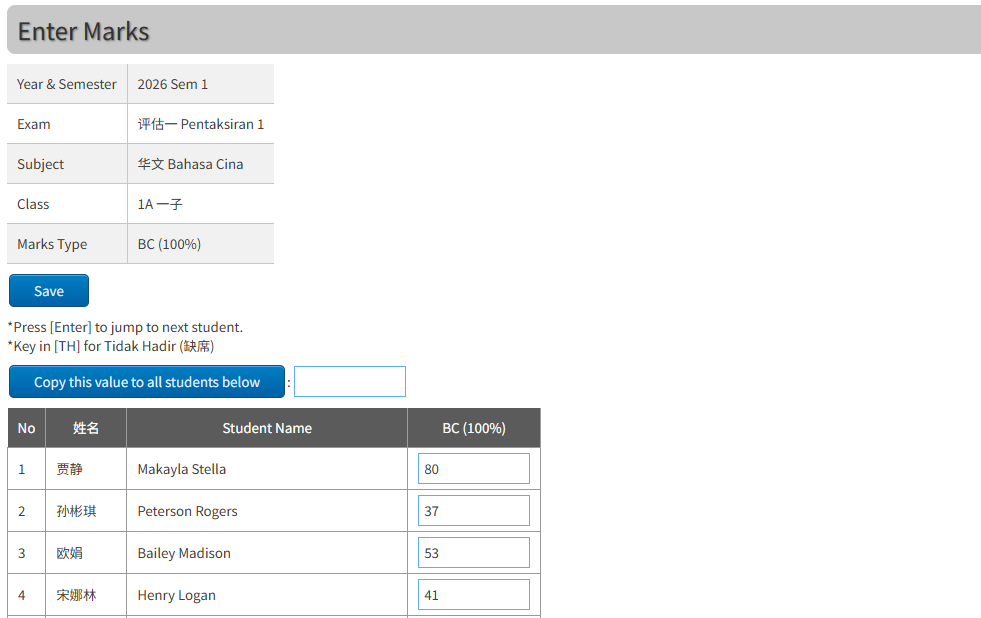
Teachers see only the subject × class combinations they are assigned to. Each cell is validated as it is typed: numeric range, grade A–E, TP 1–6, “TH” for Tidak Hadir, “-” for blank. Invalid marks block the save and show a per-student error list, so nothing wrong ever reaches the report.
- Live in-page validation on every mark
- Keyboard-driven row-by-row entry
- “Copy this mark down” helper
- Weight, height, attendance, comments & behaviour (操行)
- Headcount (TOV / ERT / UASA) module included
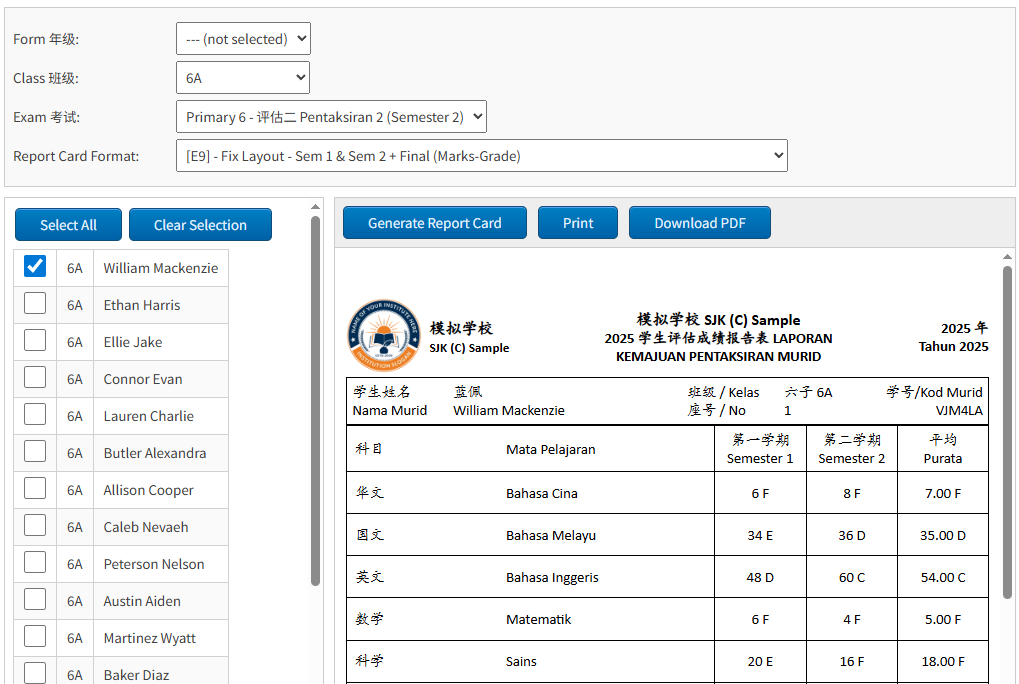
25+ Report Card Layouts, with PDF Download
The report card module ships with a library of pre-built layouts - A1–A4, B1/B2, G1–G8, E9 and variants - covering fixed two-exam and dynamic multi-exam formats, with or without comments, weight/height, rank, BMI or logo. View in-page, print directly, or download as PDF.
- Report Card with 25+ formats
- One-click PDF download per student or class
- Class Exam Result spreadsheet, sortable & printable
- TP analysis (Analisis Peperiksaan TP) with PDF / Excel export
- Adjustable font size for print & PDF
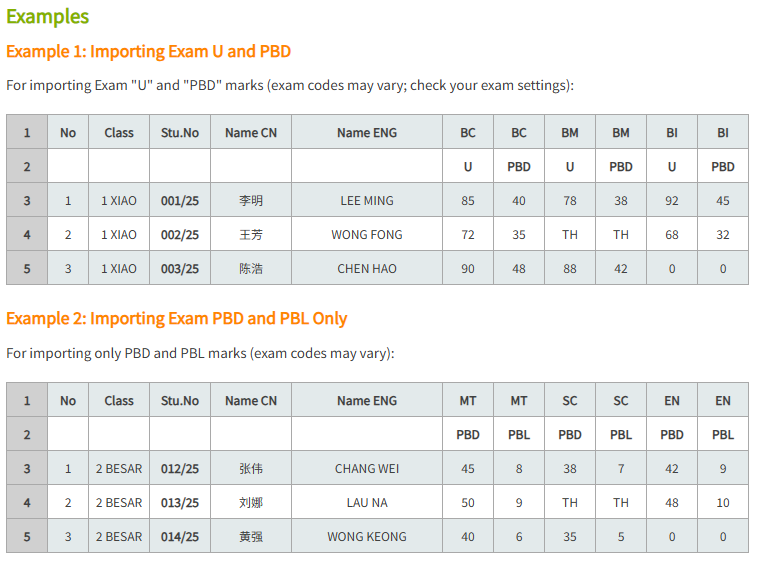
Real Excel Import & Export, Not Just CSV
Bulk-import marks for an entire exam from a prepared Excel template - subject codes in row 1, exam codes in row 2, student data from row 3. Every cell is validated before commit; on failure you get an in-system error report, on success an import summary. Student rosters import the same way.
- Excel template for bulk mark import
- Validation preview before commit
- Student roster import (IC, APDM ID, class, name, gender, seat)
- Class & analysis exports to Excel
- Supports “TH” for absent and intentional blanks for deletion
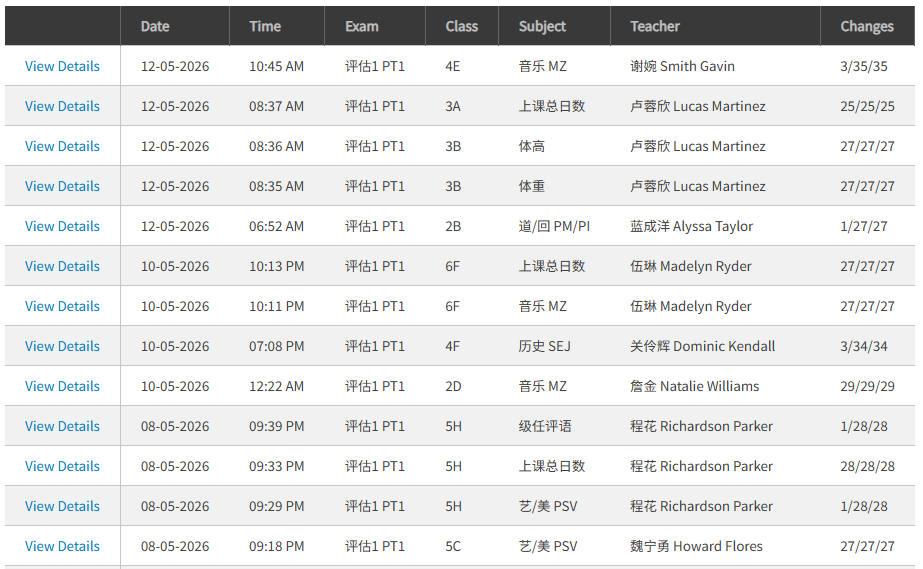
Full Marks History, Permission Windows & Backup
Every save of marks records the date, teacher, class, subject, exam, total edits and total students completed - with a per-event detail drill-down. Administrators control which exam × subject combinations are open for entry, and can take on-demand timestamped backups (ZIP) from inside the web app.
- Full marks history with per-teacher filtering
- Per-exam, per-subject mark-entry windows (lock & unlock)
- Built-in on-demand backup & restore (ZIP)
- Role-based menus (Administrator vs Teacher)
- System-wide announcement banner for all users
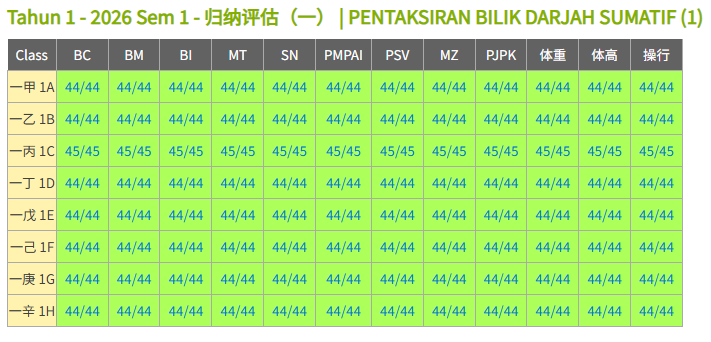
Mark Entry Dashboard - Class × Subject Grid in One View
The Enter Exam Marks dashboard lays every open exam out as a class × subject grid, one row per class and one column per subject. Each cell shows the live key-in progress (e.g. 23/30) and is colour-coded - grey for not applicable, green for fully entered, white for in progress - so administrators and teachers can see at a glance exactly which class × subject combinations still need attention. Click any cell to jump straight to the mark entry screen for that exam, class and subject.
- Class × subject grid for every open exam
- Live keyed / total counts in every cell
- Colour-coded status - done, pending, not applicable
- Click-through to the matching mark entry page
- Grouped by Tahun 1–6 with Show / Hide per form, state remembered per browser
- Two layouts: per-exam (V1) and per-semester (V2) views
- Admin “Recalculate Key-In Status” one-click refresh
- Special columns - Weight, Height, Behaviour (操行), Attendance - appear automatically when enabled
From Yearly Setup to Printed Report Cards
Yearly Setup
Admin defines the academic year, semesters, subjects, classes, exams and grade/TP scales.
Roster & Teachers
Import students from Excel or migrate from last year. Assign subject teachers and form teachers.
Window Opens
Admin uses Allow Enter Marks to unlock the exam × subject combinations for teachers.
Teachers Key Marks
Each teacher logs in, sees their grid, keys marks with live validation, and saves.
Engine Computes
Totals, averages, grades, TP, ranks, pass/fail, semester roll-ups - recalculated automatically.
Reports & 成绩册
Pick a layout, print or download as PDF. Run class, teacher and student analytics on demand.
A Clear, Sharp Role Model
Office & Curriculum Admin
Full access to settings, year configuration, subjects, exams, classes, users and student import. Runs every report, manages mark-entry windows, backups and the announcement banner. Decides whether teachers can see reports.
Subject & Form Teachers
Logs in to the Enter Exam Marks dashboard scoped to their assigned subject × class combinations. Sees marks history, class list, can search and edit students, run reports (if enabled), and key headcount targets.
SJKC Primary Schools
Tahun 1–6 / 一年级–六年级. The data model, terminology (Bahasa Melayu / 国文 / TP / 操行 / TOV-ERT-UASA) and report layouts are all built for Malaysian Chinese primary schools.
Rich Customized Reports - Plus Analytics
Class × Subject Analysis
Pass/fail rates per subject per class, with single-subject-fail and all-pass lists.
Per-Student Analysis
Drill into any student. A-list top performers, single-subject-fail lists, full history.
Per-Teacher Performance
Teacher-by-teacher results and class-vs-class comparisons across the form.
Class Result Spreadsheet
Sortable, configurable grade/TP display, statistics row and adjustable print font size.
Semester Roll-Up
Sem 1, Sem 2 and Final are virtual exams computed from the real underlying exams.
Headcount (TOV / ERT / UASA)
Dedicated module: year-keyed entry, customisable Analisi Mata Pelajaran report, its own history log.
TP Analysis Report
Analisis Peperiksaan TP grouped by form or by subject - view, print, PDF, Excel.
Marks History Log
Full audit trail of who entered which marks, when, with per-event detail drill-down.
Make This Year's Exams
Easier Than Last Year's.
Tell us about your school - how many forms, how many exams a year, the report card layouts you currently use - and we will walk you through a live demo with a real bilingual report card. We respond within one working day.