
DS School Library Management System Run your school library end‑to‑end from one browser.
A complete web-based library management system for schools - catalogue books, manage student members, run circulation, print barcodes and membership cards, and track every visit, lend and return from one browser.
Overview
DS School Library Management System is an online web application built specifically for school libraries. So any computer in the school, the librarian's PC, an assistant counter, a dedicated visit-tracking kiosk, or a public OPAC search terminal, can use it through a browser, with no per-seat install required.
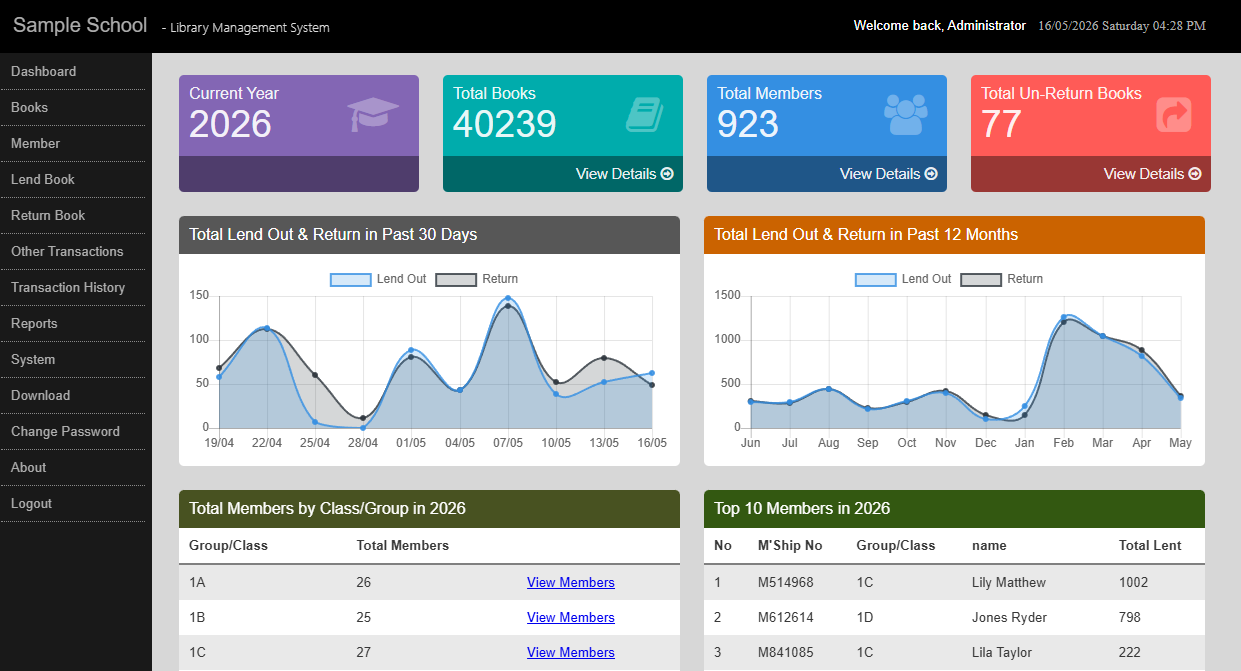
The system covers the full daily workflow of a school library: cataloguing books with barcodes, registering and migrating students between classes each academic year, lending and returning books with overdue and fine calculation, and tracking student visits. A live dashboard surfaces monthly lend and return activity, top books, top members and class counts, replacing fragmented spreadsheets with a single source of truth.
Easy Management and Operations
Built around the real workflow of a school library - not a generic checkout system retrofitted for schools.
Scan, Lend, Return in Seconds
Single-screen Lend and Return pages with barcode scanning, automatic member lookup, due-date calculation and overdue fine capture. Counter staff learn it in a single training session.
Year-end Class Migration
Promote whole cohorts of students into the next academic session in one batch - with an automatic database backup taken first. A genuine pain point that most generic systems leave unsolved.
Live Dashboard & Reports
Chart.js dashboards for 30-day and 12-month circulation, plus a full report hub: top books, top members, late returns, monthly visitor stats and more - exportable to Excel.
Key Features
Every module listed below is in production use today.
Book Cataloguing
Add, edit, search, export and delete book records with title, author, publisher, price, ISBN, Dewey Decimal classification, language, category, location code and per-copy barcodes.
Barcode Printing
Generate A4 sheets of book barcodes, print from Excel, or send jobs directly to a configured TSC thermal printer. Block dimensions, font size and location code are fully configurable.
Lend & Return
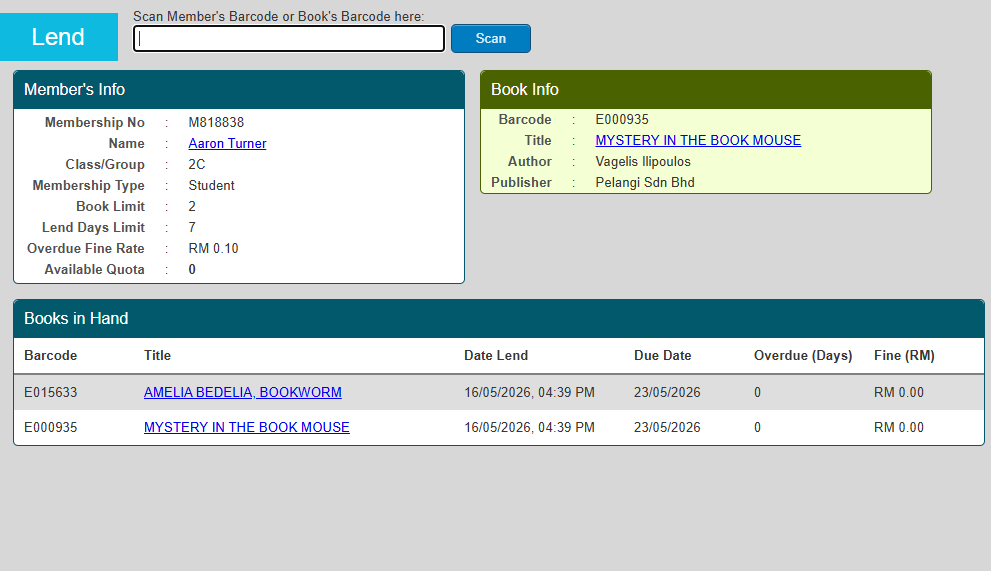
Scan a member or book barcode and the page auto-resolves member info, quota, due date, books on hand and overdue days. Capture payment, balance and remarks in one screen.
Overdue Fines
Automatic overdue-days calculation with per-member fine rates. The return screen lets staff choose "Return As Late" or "Return As Not Late" with payment capture.
Member Management
Search, add, edit and import members from Excel. Per-member fields include membership type, class/group, photo, email and tags; member photos appear on the lend/return screens.
Class Migration
End-of-year migration of students from one academic session to the next, either individually or as a batch by class - with an automatic backup taken before migration runs.
Membership Cards
Built-in card template designer and batch printing queue that pulls selected students and renders cards for 100 mm × 75 mm card stock.
Visit Tracking
Two kiosk modes: a barcode/ID-scan kiosk with bilingual welcome messages, and a touch-friendly class-then-student picker with a live today's-visitors panel.
OPAC
Standalone, login-free Online Public Access Catalog page for students - with pagination and book status/location lookup. Open to anyone on the school network.
Excel Import & Export
Import members and books from Excel templates with pre-import validation reports; export books, members and transaction history back to Excel with ClosedXML.
In-app Backup & Restore
Create timestamped MySQL backups directly from the browser and restore from an uploaded file - no command-line access needed.
Audit Trail
Every transaction records which staff user performed it. The Transaction History report includes a Staff column and a per-session activity drill-down.
A Closer Look
The features school librarians rely on the most, in detail.
One-screen lend / return with built-in fine calculation
The counter staff workflow is a single page. Scan a member's card to see their photo, quota, books in hand and any outstanding fines. Then scan books to lend, or switch to Return to instantly see overdue days and the calculated fine.
- Auto-resolves member from a scanned ID or member barcode
- Per-membership-type quota, lend-days and fine rate
- Choose "Return As Late" or "Return As Not Late"; capture payment and balance
Chase down overdue books in a single screen
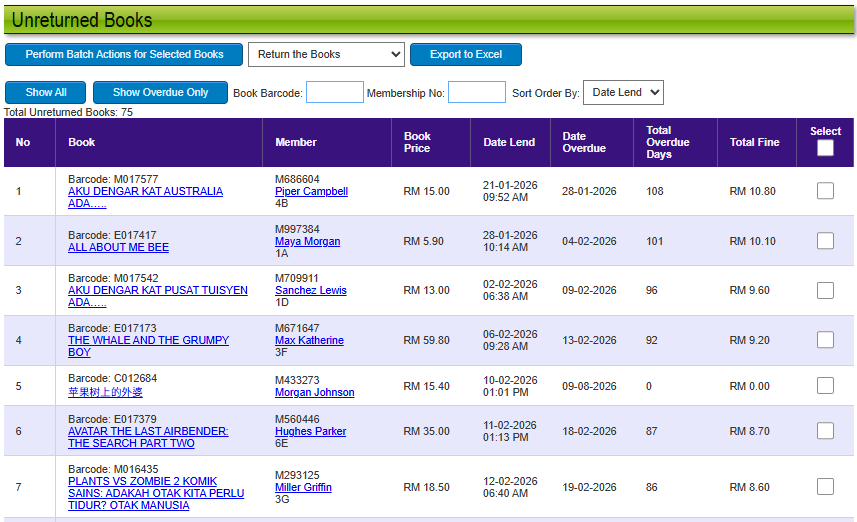
The Unreturned Books report lists every book still out on loan, with the borrower, class, lend date, allowed days, days overdue and calculated fine all in one row. Filter by barcode, membership number, or "overdue only", and sort by date lent or by class so form teachers can hand back lists ready to act on.
- Tick rows and batch-process: return, mark as lost, or cancel the transaction
- Automatic overdue-days and fine calculation per membership rate
- One-click Export to Excel for class teachers and admin records
Various built-in reports - from top borrowers to language trends
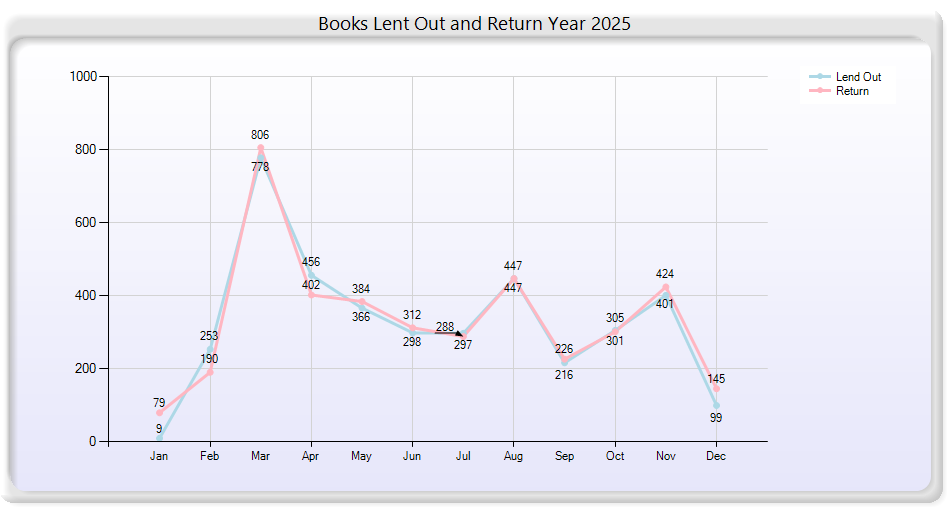
Every figure the librarian, principal, or PIBG might ask for is already a click away. The Reports hub bundles ranking reports, class and language breakdowns, visitor analytics, and the full book-lifecycle lists (late return, lost, discarded, deleted) into one tile-based menu.
- Top Media, Top Member and Inactive Member ranking reports
- Monthly analysis by class, by group, and by book language
- Daily & monthly visitor statistics, plus lent-out-vs-return graphs
Works with Library Hardware
Beyond generating barcode images, the system drives thermal printers and pairs with any standard USB scanner.
TSC Thermal Barcode Printers
Optional direct barcode printer integration, used by both the web admin Barcode Printer Setup and the Local Barcode Printing desktop companion. Configurable label width, height and font size per printer profile.
USB Barcode Scanners
Any standard USB barcode scanner works - the lend, return, kiosk and OPAC pages treat scanner input as keyboard text, so HID-class scanners are plug-and-play with no driver install required.
Generic Laser Printers
Fine barcode printing via laser printer. For schools without a thermal printer, the system prints A4 sheets of book barcodes or membership cards to any installed Windows printe, useful for bulk runs at the start of the academic year.
Membership Card Stock
Built-in card designer plus batch printing for 100 mm × 75 mm membership card stock. Design once, then queue up an entire class for printing from the member list.
Reports & Analytics
A live dashboard plus a full report hub - everything the librarian needs at year-end review.
One dashboard for the whole library
Live tiles for current academic year, total books, total members and total un-returned books, plus Chart.js line charts for the past 30 days and past 12 months of lend and return activity. Top 10 members and top 5 books are always visible.
Drilling deeper, the Reports section covers every angle a school principal or librarian may ask about:
Roles & Users
The right people see the right screens - with role-based menus and non-auth pages for students.
Administrator
Full library staff access: cataloguing, member edit, class migration, settings, reports, backups and user management.
Counter Staff
Day-to-day counter operator: lend, return, search books, search members and transaction history. Admin-only menus are hidden.
Students (OPAC)
Use the OPAC page without logging in to search the catalogue, check book status and find the location of a copy on the shelves.
Students (Kiosk)
Tap or scan in at the entrance kiosk - no login required - and receive a bilingual welcome message. Their visit is logged automatically.
How It Works
From a fresh install to the end of an academic year - the typical school's lifecycle.
Install & Set Up
The Installation Wizard captures school name, membership types and defaults. Create staff users and set the active academic session.
Catalogue Books
Add books one at a time or bulk-import from an Excel template. Print barcode labels in A4 sheets or directly to a TSC printer.
Enrol Members
Add students individually or import the class roll from Excel. Each member gets a class, a membership type, a quota and a fine rate.
Circulate
Counter staff scan to lend and return. The Return page auto-computes overdue days and fines and captures payment.
Track Visits
Students check in at the entrance kiosk via barcode or touch picker. Visits feed daily and monthly visitor reports.
Report & Migrate
Run year-end reports, take a backup, and use Class Migration to promote students into the next session in one batch.
Ready to modernise your school library?
From cataloguing and circulation to year-end class migration and visitor analytics, DS School Library Management System covers the full workflow in one browser-based system. Tell us about your school and we'll respond within one working day.